 IMPORTANT: You only see the data regarding the accounts you manage. If you are a monitoring user with view-only permissions, you can see the information but you cannot modify or edit any field.
MONITORING User Guide
The monitoring user is a user responsible to manage the accounts belonging to his configuration. Monitoring user's permissions and accounts are defined by the root administrator or by a global user with read/write permissions. The monitoring users can also have Read or Read/Write permissions.
When you are defined as a new user in VF360, you receive a New Account notification from the VF360 support team at the email address set as your VF360 login name. For information regarding the login process, see Log Into ViewFlow360.
To log into VF360, use the email address defined in the Email field and the password you set for yourself.
IMPORTANT: You only see the data regarding the accounts you manage. If you are a monitoring user with view-only permissions, you can see the information but you cannot modify or edit any field.
After you enter the system, select the  Menu icon and select the view you need. The default view is the Dashboard of your own company.
The Monitoring User has access to the following views:
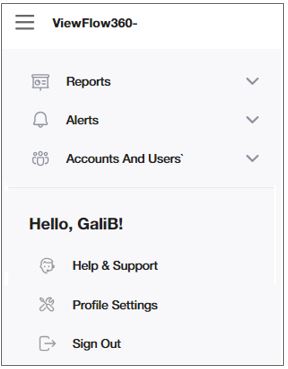
When you log into VF360, the default screen is the Dashboard, which offers a big picture of all the accounts you have permission to access and their essential information.
For information regarding the Reports, see VF360 monitoring user system reports.
For information regarding the Alerts, see VF360 monitoring user system alerts.
For information regarding the Accounts and Users, see VF360 monitoring user accounts.
The types of messages and notifications you receive are determined by the type of user you are (global user, account user, view-only user) and the notification options the administrator has selected for your user in VF360. For the complete set of messages, see The VF360 Notifications.
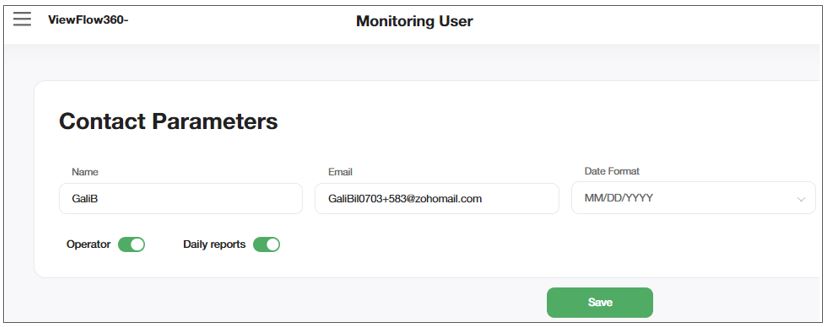
In this section you can see your own contact information and the notifications the root administrator or a global user set for you to receive.
You may only modify the Name, Email and the Date Format.
You can navigate to this screen by selecting > Profile Settings.
|
Field |
Description |
|---|---|
|
Name |
The monitoring user's user name. |
|
|
The email the monitoring user uses to log into VF360. |
|
Date Format |
The format of the dates this user sees in the system. The options are DD/MM/YYYY and MM/DD/YYYY. |
|
OPERATOR |
If this toggle button is ON, the monitoring user receives email notifications:
|
|
DAILY REPORTS |
If this button is ON, the monitoring user receives daily reports regarding workflows. |
Select Save to save the changes.