Set up the workflow system (Coretex)
To be able to use VF360, for each tenant in Coretex, you must properly set up the StatusReportAdapter of every flow step you need to monitor. These adapters send the status reports to VF360.
Below is an example of a status report for an event processed in Coretex, the CTP1 flow step:
<?xml version="1.0" encoding="utf-8" standalone="yes"?>
<events xmlns:xsi="http://www.w3.org/2001/XMLSchema-instance" xsi:noNamespaceSchemaLocation="events.xsd">
<event account_name="Account1" type="plate" color="black" name="a6-a9" publication_date="2020-10-03" publication_name="the valley news sun" edition_name="edition1" zone_name="zone2" version="1" workflowstep_type="ctp" workflowstep_name="CTP" user="prepress@suncommunitynews.com" audit="" original_name="1003_VN_A006.pdf" resource_name="DPENY-PRESSREGISTER-01" time_stamp="2020-09-30 12:37:09" state="ok" option1="Press 1:tower:cylinder_black:null:TOP" option2="2020-10-03T0:00:00" option3="" option4="" option5=""></event>
</events>
The structure of this report is defined in Coretex and cannot be modified.
To set up a flow step to send status files to VF360, you must program the StatusReportAdapter in that particular step.
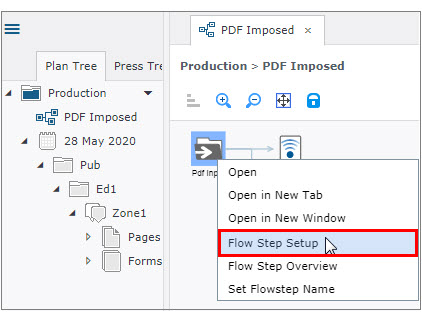
In the workflow view, right click the flow step and select Flow Step Setup in the context menu.
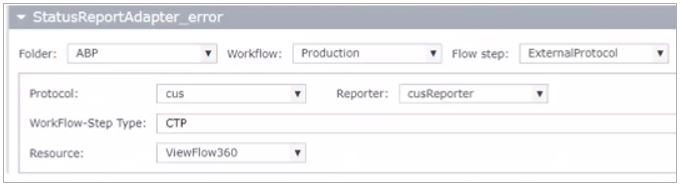
There are two types of StatusReportAdapter you must set to send reports regarding the status of the event after it is processed in the flow step: StatusReportAdapter_Finish and StatusReportAdapter_Error. If an event ends OK, the StatusReportAdapter_Finish sends the report. If the event processing ends in error, StatusReportAdapter_Error sends the log file to VF360.
 IMPORTANT: The WorkFlow-Step Type defined in the adapter’s setup must match the Label defined in VF360 in Settings > Flow Step > Flow Step Setting.
|
FIELD |
DESCRIPTION |
|---|---|
|
FOLDER |
The tenant's folder name. |
|
WORKFLOW |
Workflow. |
|
FLOW STEP |
The name of the flow step to transmit the XML files. |
|
PROTOCOL |
Protocol:
|
|
REPORTER |
The Reporter must be "cusReporter". |
|
WORKFLOW STEP TYPE |
The Workflow Step Type name. For instance, CTP |
|
RESOURCE |
The resource details from the drop-down list. For instance, ViewFlow360. |